
 British English
 American English
 Australian English
 Canadian English
 Català
 Česky
Česky Dansk
Dansk Deutsch
 Español
 Français
 Français de Belgique
 Ελληνικά
 Magyar
 Italiano
 Nederlands
 New Zealand English
 Norsk
Norsk Polski
 Português
 Português Brasileiro
 South African English
 Русский
 Svenska
 Irish English
 简体中文
简体中文





Frequently Asked Questions
About Pitchup.com
- How did my site end up on Pitchup.com? How do I remove my listing?
Holiday parks and campsites get listed on Pitchup.com in a few different ways:
- A user familiar with your site may have alerted us to its existence
- We may have heard about your campsite/park from a third party, such as a tourist board
- Our editors may have come across a reference to your campsite/park in an article, guidebook, brochure or websiteBecause we want to be a comprehensive source of campsite information for our users and we accept reviews for all holiday parks and campsites that are listed on our site, we will not remove a listing at the management's request. If you'd like to remove your listing because your site is permanently closed contact us.
- How do I contact you with other questions?
We’re very happy to answer any other questions or comments – please use our contact form. You can also send us problems with the site or ideas for how to improve via our feedback form.
- What can Pitchup.com do to generate more business for my site?
Pitchup.com gives your site immediate access to up to 180,000 daily visitors looking for a site matching their exact criteria, and the chance to capitalise on our national media coverage. We can help you with shoulder season, mid-week breaks, special offers and main season - providing a similar service to LateRooms or lastminute.com in the hotels market. We can refer customers to you who are unlikely to have come across your holiday park or campsite otherwise and we've got the testimonials to prove it.
Research into online travel has shown that one-third of online customers now book via a ‘one-stop shop’, rather than via suppliers’ websites (source: PhoCusWright), a very large market to tap into for extra bookings. Contacting a list of individual sites about availability can take days and many users won’t wait, especially at the last minute. Our users want to search and book multiple sites in one place and it is these additional customers that Pitchup.com provides access to.
The more information about your on-site facilities/amenities and good-quality photographs you add to your listing, the more referrals you'll receive as you’ll appear higher in search rankings and you will also feature as a local site when users are looking for festivals and attractions. To make the most of Pitchup.com, become a bookable listing and we could generate as many as 3,400 bookings for you per year.
To find out how Pitchup.com can boost business at your campsite click here.
- How does the booking system work?
Here's how the process works for bookable sites:
- Manager specifies pitch types, allocation, prices, extras and minimum-stay rules (all changeable at any time).
- Pitchup.com displays matching accommodation and prices to the user at the top of search results.
- We take the booking via a simple one-page booking form, taking our commission as a deposit, and send a confirmation email, copied to your email address. All bookings are also displayed in the "Bookings" tab across the top of your manager portal.
- Site collects the remaining balance from customer on arrival, or if you are signed up to Payup to collect payment in advance, the remaining balance will be automatically debited from the customer’s payment card on the payment ‘due date’. Pitchup.com calculates this using the payment date settings entered in your portal and the payment will be made direct to your Stripe account. Where the booking is payable ‘as soon as possible’, Pitchup.com will take the full payment at the time of booking and the balance payment will go directly into your Stripe account. You can specify your own cancellation and payment policies - all customisable on Pitchup.com.
- No further commission is due.
- How many vacancies should I allocate to Pitchup.com?
At Pitchup.com we ask that our clients add a reasonable level of vacancies throughout your season so that our customers' searches yield good results. Our allocation thresholds also reflect the growing advertising value of a Pitchup.com bookable listing, which stays live throughout without allocation.
Typically we require allocation at weekends and during peak season in addition to less popular periods.
Having higher allocation on Pitchup.com also brings other advantages:
More visibility: listings with consistent allocation across the year, including peak season and at weekends, rank higher in Pitchup.com search results when customers search our site. Consistent allocation levels generate more off-peak bookings.
More bookings: a good level of allocation increases your chances of bookings on Pitchup.com. Our best-seller had over 3,400 bookings in 2020 alone thanks to consistent allocation across their opening dates.
Press coverage opportunities: Our media team works hard to raise awareness of Pitchup.com sites and parks with good allocation, both online and in the national print media. Our clients tell us that press coverage attracts customers who would not normally have come across their business.
Remember - if you need to reduce, increase or cancel Pitchup.com’s allocation as the date of the holiday approaches, you can update the site instantly - there are no penalties or release fees, either.
To avoid any possibility of double bookings, we recommend allocating vacancies to us on an exclusive basis, blocking out these vacancies so that they're not available to book direct with you or via another booking agent.
- How much should I charge Pitchup.com customers?
Pitchup.com does not allow you to set premium rates for Pitchup.com and/or mark up rates for Pitchup.com in any way, so campsites and holiday parks must always enforce ‘rate parity’. By accepting Pitchup.com’s terms and conditions, you agree to pay our commission to take advantage of the services provided by Pitchup.com and reach the large number of customers the website provides. This commission may not be passed onto Pitchup.com customers, since customers do not pay a fee to use Pitchup.com.
Rate parity means the same and/or better rates for a pitch or unit type and any associated extras booked for the same dates and for the same number of guests. The rates must be subject to the same and/or better restrictions and policies such as payment, booking amendment and cancellation policy as are available through booking directly and following the standard price list (that is the rate charged for customers booking direct). This includes any bookings made via your websites, apps, phone (including call centres and customer reservation systems) or via any other third party that is a business partner of, or in any other way related with or connected to, the campsite.
Please note: Pitchup.com regularly performs random price comparisons to ensure that all partners are advertising rates in adhering to rate parity - overcharging customers will result in the temporary suspension of the listing.
Where the rate parity policy is breached, the manager shall immediately notify Pitchup.com by flagging the booking, agree to refund/discount any difference, and update Pitchup.com rates to adhere to rate parity.
- I am VAT registered in the UK, how do I account for VAT on Pitchup.com bookings?
Pitchup.com acts as your agent (that is, the contract is between you and the customer). For businesses based in the UK, the commission ('deposit') we deduct from bookings includes 20% VAT, which we pay to HMRC.
If you are VAT registered in the UK you can reclaim this amount. In your VAT return, you should account to HMRC for the full amount paid by the customer, including the amount deducted by Pitchup.com. You can download a VAT invoice for our commission from the 'Bookings' tab at the top of the Manager Portal. You can select any date period for each VAT invoice, based on arrival date or created date.
If you are signed up to Payup, there is no change to the way you would account for your VAT. You would account for VAT on the full amount of the booking (balance payments are made direct to your Stripe account and then bank account).
You can download a tax invoice for your Stripe fees by clicking on your user name at the top right-hand corner of your Stripe account and then 'Account Settings', and visiting the 'Documents' tab.Please consult your accountant for further advice on accounting for bookings through Pitchup.com.
If you need to issue a VAT invoice to a customer, please note that this should be for the full amount of the holiday including the Pitchup.com deposit.
- I would like to list my non-UK campsite/holiday park on Pitchup.com without taking bookings. Can I do this?
Due to different market requirements, we are currently only able to feature non-UK bookable listings on Pitchup.com.
Becoming a bookable listing is easy! It is free with no regular costs or tie-in, to find out more information click here.
To add your campsite/park click here.
If you have any questions or doubts, please contact Pitchup.com using our contact form, our multilingual account management team will get you set up.
- We are not based in the UK. How do I account for sales tax on Pitchup.com bookings?
Pitchup.com acts as your agent (that is, the contract is between you and the customer). For businesses based outside the UK, the commission ('deposit') excludes VAT and you would be unable to reclaim sales tax on our commission. You can download an invoice for our commission from the 'Bookings' tab at the top of the manager portal. Click 'VAT invoice' and select any date period for each invoice, based on arrival date or booking date.
If you are signed up to Payup, you can download a tax invoice for your Stripe fees at https://dashboard.stripe.com/account/documents or by clicking on your username at the top right-hand corner of your Stripe account and then 'Account Settings', and visiting the 'Documents' tab.
Please consult your accountant for further advice on accounting for bookings through Pitchup.com.
- What is your commission?
There is no charge for using Pitchup.com. We only get paid when we send the bookings to you. Read more here.
- Where can I download your app?
Pitchup has upgraded its app to a new web-based version that is not available in Google Play or iTunes.
To download the app:
Chrome browser
- Open the Chrome browser (if you have an iPhone and don't have Chrome installed, you can download it at iTunes)
- Visit our mobile site at https://www.pitchup.com
- After browsing the mobile site, you should be shown a button to 'Add to home'. If the button fails to appear, open the menu at the top right of Chrome, and tap 'Add to Home Screen'
Safari browser
- Tap the bookmarks icon
- Tap 'Add to Home Screen'
- Tap 'Add' at the top right-hand corner
Alternatively, visit www.pitchup.com on your smartphone or tablet to use our mobile site instead.
Note: if you manage a campsite listed on Pitchup, a link to the mobile-friendly version of the allocation page is shown on the homepage when you're logged in to our mobile site. You can log in via the side menu.
- Who is Pitchup.com Ltd?
Pitchup.com is the trading name of Pitchup.com Ltd. We are registered in England and Wales at Zeeta House, 200 Upper Richmond Road, London SW15 2SH.
Booking questions
- A customer wants to change or cancel a booking - how do I do this?
You can cancel a customer’s booking by flagging it in the Bookings tab of your manager portal, or the customer can cancel themselves in their Pitchup account.
Amendments can only be made by the site owner flagging the booking. If a booking is amended and the cost for the new holiday is lower than the original cost, discount 15% from the new total to calculate the new balance due from the customer.
Please do not send customers to Pitchup, as we cannot confirm changes or cancellations on your behalf.
Note: If a booking is amended and the cost of the new holiday is higher than the original cost but you can't ask them to simply book more dates (e.g if the new booking wouldn't meet the minimum night stay requirement) then you need to collect the additional cost from the guest directly. This will not automatically be requested. An easy way to do this is by using a Stripe payment link to request the additional balance.
Flagging bookings is the quickest and easiest way to update your Pitchup.com allocation and records and to inform our team of any changes or issues. Even if you use Payup and have already clicked ‘pending’ to cancel the customer’s balance, please do still flag the booking.
a) Customer request to amend a booking
To change a booking’s dates and/or pitch type:
-
Visit your Bookings tab
-
Locate the booking and click on the flag on the left-hand side
-
When the pop-up window appears, choose ‘Customer amended’
-
If dates are changing dates, choose the new start and/or end date. If the pitch type is changing, choose the new pitch type from the drop-down menu.
Allocation will be restored on any dates no longer used for the booking. If you would like to remove it, visit your Allocation tab.

b) Customer request to cancel a booking
We would urge you to encourage customers to postpone wherever possible, rather than cancel. To cancel a customer’s booking:
-
Visit your Bookings tab
-
Locate the booking and click on the flag on the right-hand side
-
When the pop-up window appears, choose the type of cancellation
-
You can also choose whether to restore allocation or not for the dates booked
If you are signed up to Payup, the payment date settings you have set in the portal will affect how you deal with a cancellation or amendment. Click here for more information about cancellations using Payup, and click here for more information about amendments using Payup.
Flagging a booking as cancelled will prevent it from appearing in our arrival reminders.

Please note that Pitchup.com's deposit is generally non-refundable, but you will need to refund it in these circumstances.
If a customer cancels their booking in their Pitchup account, allocation will not be restored during this period.
If you issue a credit note and include the Pitchup deposit, please flag the booking so that we are aware of this.
How will this look in my ‘Bookings’ tab?
-
The booking will show as amended in the list of bookings in the ‘Bookings’ tab, and - if the customer has a Pitchup account - in the customer’s account
-
By clicking the row corresponding to the amended booking, you can view the history of changes made to the booking, with the date and time of the change
Will a new booking confirmation email be generated?
-
No. However, if you make the amendment to the booking and the customer requests that a new confirmation email be resent via our resend tool, the change will be reflected on the new confirmation email sent out
-
Future emails about the booking (arrival reminder to campsite, review invitation to customer) will be updated to reflect any booking changes
Will my rates or allocation be affected?
-
There is a warning note, but moving the booking will use a unit of allocation on the new date or pitch type moved to, and will release a unit of allocation on the old date or pitch type moved from. Therefore, allocation must exist on any new dates in order for the amendment to work
-
If the date or pitch type the booking is being moved from no longer has allocation left, you must manually close this out to avoid overbookings
-
Prices and payments are unaffected by amending the date or pitch type
I’m using integration- how will this work for me?
-
Booking systems integrated with Pitchup.com via API can extend their integrations so that cancellations and amendments are automatically passed through. Please request this from your booking system if this is of interest and is not yet in place.
-
If you have an iCal integration in place, to prevent conflicts you may need to manually remove a booking from the allocation grid to reflect a customer cancellation. To do this, go to the Allocation tab, click on the booking on the grid and click on ‘Remove booking’.

How do I move a booking to another unit or pitch type?
a) Moving bookings to a different unit in the same pitch type:
-
Visit your Allocation tab.
-
Find the relevant month and locate the booking in the grid.
-
Click and hold onto the booking and drag it to a new unit. You can do this as long as there is space available.
-
Once the booking is in the new unit, the change is complete.
b) Moving bookings to a different pitch type:
-
See the guidance above under part a) "Customer request to amend a booking", point 4.
-
- Am I entitled to a refund for my holiday?
When you make a booking on Pitchup, you are booking directly with the property (campsite or holiday park), and its cancellation policy applies.
Please check the cancellation policy and terms that appear in your confirmation email or in your Pitchup account.
Please consider postponing, rather than cancelling, your holiday. Most sites are under serious financial strain at present and are offering special arrangements to postpone bookings.
The property may agree to a later arrival date, or an exceptional refund - please discuss this with them directly using the contact details in your confirmation or in your Pitchup account.
If you have not yet paid the balance on your holiday, you can cancel your holiday via your Pitchup account, subject to the site’s cancellation policy. For any exceptional circumstances (for example serious illness), please contact us.
Your travel insurance may cover cancellations where the destination appears in the government’s list of restricted destinations.
- Can customers provide the type and size of their unit?
To capture the type and size of unit that customers will be bringing with them:
- Visit the 'Pitch types & extras' tab
- Click 'Edit' on a pitch type (note that this is only for camping and touring, not for rental accommodation units)
- Tick 'Require type and size of unit'
- Click 'Save your pitch type'

With the above ticked, when customers provide their booking details, they will see:

We block customers from booking if the size of unit exceeds the maximum size specified.
- Can I ban a customer?
Prevent a problematic customer from booking using one of the two ways below, depending on whether the customer has booked with you on Pitchup before.
1. Customer has a past booking
To ban a previous Pitchup.com booking:
- Visit the Bookings tab
- Click the flag icon and choose Type 'Flag customer details, denying further bookings':

- Complete the rest of the form and hit 'Submit'
2. Customer has not yet booked
Contact us to send us the customer's email address and/or phone number.
What happens when a banned customer tries to book?
When a banned customer tries to book, if either the phone number or email address match an entry, we decline the booking and the following error message is shown:

Bookings flagged before the ban tool
The ban tool and flag reason ('Flag customer details, denying further bookings') were introduced on 3rd October 2023.
If you have previously flagged a booking as banned, you can still reject a new booking from the same customer.
- Can I change my plans if I’m unsure - even though official advice still allows travel to my destination? For example, if I have a pre-existing medical condition.
Unless official advice is against travel to your destination, the property’s normal cancellation policy would usually apply. Travel insurance policies would also normally only cover destinations where the government of your home country has put in place restrictions.
The property may agree to a later arrival date, or an exceptional refund - please discuss this with them directly using the contact details in your confirmation.
- Can I set a maximum stay rule?
a) Your listing does not use API integration
- Go to the 'Site Info' tab on the manager portal
- Select the 'General info' sub-section
- Enter the value in the 'Maximum stay' field

b) Your listing uses API integration
A maximum stay rule can be set via API on every single day (now available in version 2023-08-25 of the Pitchup API).
- Can I stop last-minute bookings?
Did you know that 7% of Pitchup bookings are now made on the same day, and 8% the day before arrival?
To help make the most of last-minute bookings without the hassle, you can now disable bookings within a different time period for each pitch type*.
For example, you might choose:
- 4 hours for non-electric grass pitches
- 1 day for hardstanding pitches
- 1 day for lodges
To set your limits:
- Visit the 'Pitch types & extras' tab
- Click 'Edit' on a pitch type
- Choose from the 'Prevent last-minute bookings' menu
- Click 'Save your pitch type'
*Customers are also prevented from booking on the arrival day after your last arrival time listed in Site Info > General Info under 'Arrival & departure times'
- How can I avoid double bookings?- Check the manager portal regularly- Consider allocating vacancies to Pitchup.com on an exclusive basis- For vacancies not exclusive to Pitchup.com: keep your allocation up-to date and adjust your allocation immediately when you receive a direct booking, especially if you sell out- Make sure someone on site is trained to manage the Pitchup.com manager portal at all times to keep your allocation updated- If you are worried about receiving very last-minute bookings, you can choose to disable bookings within a certain number of hours before arrival. Find out how to do this hereIf you do get a double booking, find out what to do here.
- How does Pitchup help avoid double bookings?
Over the years we have developed many features to minimise double bookings, including a mobile-friendly page to change vacancies instantly, text message confirmations, settings to prevent last-minute bookings, regular email updates and integrations with online calendars and more than 70 booking systems.
- How do I integrate with Pitchup.com?
Link your booking system with Pitchup.com via our existing integrations, add a calendar feed or develop a new integration with our API. Visit our integration page for more information.
- How do I know what type/size of unit the customer is bringing?
To request that customers provide their type and size of unit when booking a camping pitch, tick the 'Require type and size of unit' box under 'Rules' on the pitch type page.
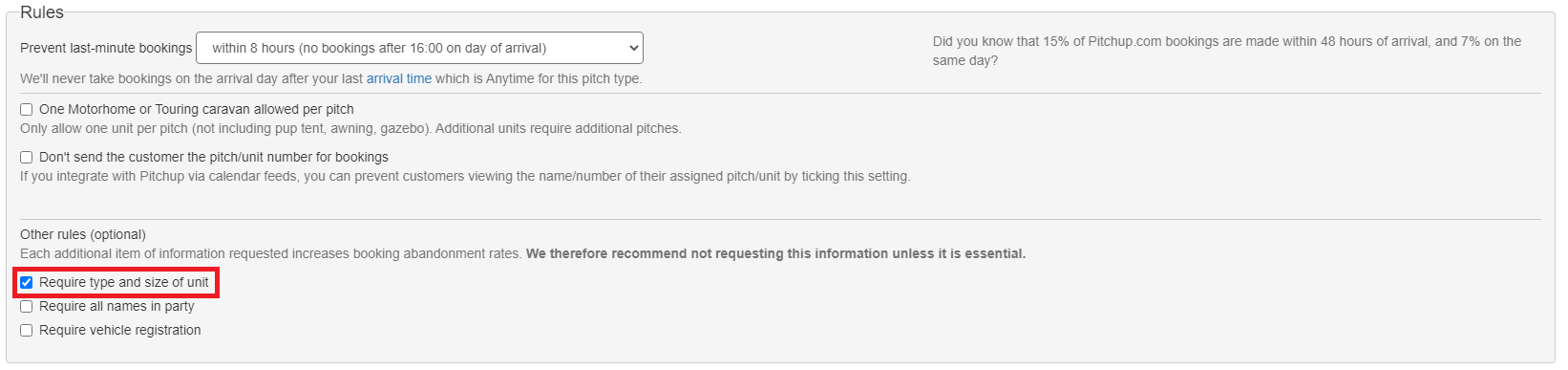
Bear in mind that each additional item of information requested increases booking abandonment rates. We therefore recommend not requesting this information unless it is essential.
- How do we find out about bookings?
Pitchup.com booking confirmation emails are immediately sent to the customer AND to the email address specified for your site (not the Manager's email address). Please check email regularly to ensure that last-minute bookings aren't a surprise! To find out how to copy other email addresses into your booking notification emails, click here.
We show all bookings in a 'Bookings' tab within your manager portal, and we automatically reduce your allocation - so you have full visibility of the remaining allocation.
You can download a spreadsheet of all your bookings over any date range, and they are also available as a live calendar feed.
- What is the current UK government advice for my destination?
Visit the FCO website to check restrictions for your destination. This advice applies to “imminent” departures.
- What is the flagging system?
Please use the flagging system in the 'Bookings' tab of your manager portal to inform Pitchup.com of any booking problems as soon as they occur.
Use the flagging system to notify Pitchup.com of double bookings, any bookings that break your booking conditions, a booking that has been processed at the incorrect price, or if a customer has cancelled or amended their booking with you. By using the flagging system effectively, it will ensure you receive daily booking reminder emails that are completely accurate and up to date.
This is the quickest and most straight forward way to inform Pitchup.com of any booking problems or double bookings, especially in our busiest season. This should be your first and foremost way to contact us about these issues, rather than by phone.
The flagging system is easy to use:
- go to your ‘Bookings’ tab in the manager portal
- click on the flag to the left-hand side of the booking you wish you contact us about
- a form will pop up for you to fill in and submit to Pitchup.com

- What restrictions have destination countries put in place?
Destination
Status
Until
Source
UK
- Northern Ireland: All tourism accommodation and hospitality venues are open.
- England: Holidays in England are allowed and holiday accommodation are open.
- Wales: All holiday accommodation are open and there are currently no restrictions on travelling to Wales.
- Scotland: Tourist accommodation are open and there are currently no restrictions on travelling to Scotland https://www.pitchup.com/covid-camping/
Department for the Economy - Northern Ireland
Ireland
- Campsites and holiday parks are open.
-
Indoor restaurants and bars are open and proof of vaccination (or recovery from COVID-19) is no longer required to access indoor services.
- Social distancing is no longer required.
France
-
Campsites and holiday parks can accommodate guests in compliance with health regulations.
- Since 14 March 2022, the application of the "vaccine pass" (proof of full vaccination for all persons 16 years and older) has been suspended in all places where it was required (places of leisure and culture, catering activities, trade fairs and exhibitions, long distance transport...).
Italy
-
There are no coronavirus entry rules for people travelling from abroad.
-
The health certificate is no longer required to access businesses and services, including campsites and their facilities.
-
Here you can find updated information on the anti-Covid measures currently in force in Italy.
Netherlands
-
There are no coronavirus entry rules for people travelling from countries within the EU/Schengen area and from countries participating in the EU travel rules scheme.
-
If you are travelling by air, complete a health declaration form.
-
Find out the rules that apply when you travel from other countries via this link.
Spain
-
Campsites and holiday parks can accommodate guests in compliance with health regulations.
-
Regional governments are in charge of implementing their own restrictions to control the pandemic, so regulations may vary according to each region. You can find specific information for each region here.
-
The use of face masks is no longer required in public places, although it is mandatory in public transport and health centres.
- In order to enter Spain, all travellers regardless of their country of origin must show an EU Digital Covid Certificate or equivalent proof of vaccination, proof of recovery, or negative test result. Find specific information here.
Mandatory online form to enter Spain
Germany
-
There are currently no COVID-related regulations for the tourism and hospitality sector in place. Admission to campsites, restaurants, bars, shops or venues is no longer subject to restrictions.
-
The use of face masks is obligatory only in public transport and health clinics. Venues and public places may introduce the use of face masks individually.
-
The federal states have the right to declare themselves a “COVID hotspot”, introducing regulations such as the use of health certificates or masks as entry requirements. A collection of links to the websites of all federal governments is available here.
- There are no restrictions when travelling to Germany from abroad. Further information on entry regulations is available on this website.
- When can I collect the balance?
You determine your own policy regarding when you would like to receive the balance payment. This policy is displayed prominently for customers on the 'Policies' tab on your listing, on the booking form, and on the customer’s booking confirmation email. We take our commission as a 'deposit' on booking, so we do not allow campsites/parks to take a second deposit because this confuses users and they may decide it's not worth the hassle.
If you normally take a deposit at some point after the Pitchup.com booking, we advise you to take the full balance, since customers have already paid a deposit to Pitchup.com. Some of our sites take the balance on arrival - please bear in mind the risk of customers cancelling or not turning up.
To avoid chasing payments and losing money from no-shows, listings in countries where Stripe is supported which are going live for bookings will need to sign up to Payup, our automated payment system, if they wish to collect the balance payment before arrival. Payup will trigger the balance payment from the customer’s card (on the date specified by the campsite/park) and send it direct to your bank account. Find out more about Payup here.
You may need to modify your cancellation policy to take account of the fact that Pitchup.com's deposit is non-refundable (check the circumstances under which you need to refund the Pitchup.com deposit here). Please inform Pitchup.com if a customer cancels their booking with you using our flagging system in the 'Bookings' tab of the manager portal. This will ensure you receive daily booking reminder emails that are completely accurate and up to date.If you are signed up to Payup, the payment date settings you have set in the portal will affect how you deal with a cancellation. Click here for more information about cancellations using Payup.
Listing questions
- Can I copy booking confirmations to another email address?
You can choose for more than one email address to receive booking notifications, so staff who deal with bookings at your campsite or holiday park can be notified of bookings made through Pitchup.com. To add email addresses:
- click on 'Me' at the top right-hand corner of your manager portal
- click on 'My details'
- scroll down to 'Notification settings'
- add email address(es) for other recipients in the bcc section
Note that if you manage multiple sites within one Pitchup.com account, this setting will affect bookings for those sites.
- Can I display the Pitchup.com availability calendar on my website?
Yes - please feel free to link your Pitchup.com listing to/from your website. To visit the Pitchup.com's badge factory click on "promote your page" at the top right hand side of your manager portal and use the drop-down menu to find your favourite option.
- Can I set a maximum stay rule?
a) Your listing does not use API integration
- Go to the 'Site Info' tab on the manager portal
- Select the 'General info' sub-section
- Enter the value in the 'Maximum stay' field
b) Your listing uses API integration
A maximum stay rule can be set via API on every single day (now available in version 2023-08-25 of the Pitchup API).
- Can I set up additional users with access restricted to the booking tab only?
You can now grant separate access to your 'Bookings' tab to other email addresses.
This means you can, for example, give staff dealing with arrivals access to a searchable list of bookings, but hide the rates and allocation tabs. The additional user can also use the 'flag' system to report any booking issues.
To set up a new user:
- Choose the listing you want to give access to from the "All sites" drop down menu at the top of the portal
- On the 'Home' tab, find the 'Additional Users' panel at the bottom:

- Enter the email address of the additional user
- The new user will receive a password by email to log in and view the listing's booking tab
Please note: if you manage multiple listings, the steps above must be followed for each.
- Can I set up pitches with optional electric hook-up?
We recommend setting up electric pitches as a separate pitch type. This way you have control over the allocation.
The downside of using a general pitch type with an optional extra for electric hook-up is that you have no way of knowing how many customers will choose the electric extra. If all customers choose the extra, you may find that you sell out of electric pitches. You could also lose out on the chance to sell more non-electric pitches if you set a low allocation in case all users choose electric.
- Can you add additional award schemes to your list?
At present we show official grading, AA rating and David Bellamy award. Please use our feedback tool to request any additional award schemes.
- How can I access my listing?
Log in to your listing, or request a new password, at our manager portal. You can log in on desktop, tablet or mobile.
- How can I change my description or local attractions boxes?
If you're a bookable site and would like to change the text in any of the text boxes in your manager portal e.g. description / nearby attractions and activities / directions, balance payment, cancellation policy, terms, notices, pitch type description, photo captions etc., please use the grey 'Request change' button next to the appropriate text box to let us know. We aim to have specific changes and updates made within a working day of these being flagged to us.
Amendments to text must be submitted via this system only, requests made by email or phone to Pitchup.com cannot be actioned.
Please note that our professional writers update the description and nearby attractions and activities text for all our live listings to:
- help your site appear higher on search engine results; and
- ensure that all Pitchup.com listings have original text tailored to your specific site, a feature that is not offered on other listing sites. (Please note that this text is copyright Pitchup.com and may not be used outside the site.)
As a result, we are unable to replace entire listings, or substitute several paragraphs of a listing for your own text. We are of course always happy to update or clarify a site feature if required, for example, new facilities/activities or an updated policy.
Remember it is your responsibility to keep your listing information up to date at all times and flag any changes to us. If you misrepresent anything on your Pitchup.com listing, you may be liable to compensate your guests.
- How can I improve my ranking and results from Pitchup.com?
The performance of your listing is mainly determined by (1) your ranking within search results and (2) the information provided on your page.
You will only appear in search results for searches matching your accommodation types, location and features, so ensuring that all relevant accommodation types and features are ticked is crucially important. If the user ticks the "check availability" box when searching, only bookable/available sites appear in results.
By improving your ranking on Pitchup.com you will improve your overall performance and likelihood of receiving bookings through us.
(1) The following factors will influence your ranking in search results:
- Whether your site is a bookable listing (bookable/available sites rank ahead of free listings in all search results). On average, bookable listings receive 40x more traffic than free listings.
- The sales performance of your listing. Generally, sites with a consistent allocation level throughout the season will perform better.
- The average customer rating for your site on Pitchup.com and the number of reviews your listing has attracted.
- For bookable listings, the number of cancellations due to incorrect data in our system
- In an availability search, whether you have allocation you have added for the dates, accommodation category/ies and party size searched for. If customers choose to search by a specific location, we will order the results with the closest site appearing at the top of the page. We will also display the prices for each site - so it's worth checking out your nearest competitors' rates to ensure your potential customers aren't put off by expensive prices.
- Although using Payup, our automated payment system, does not directly affect your ranking, your listing is likely to perform better compared to other listings taking payment on arrival. This will feed back into a better ranking.
(2) Once users reach your listing page, you can maximise the likelihood of users booking (rather than carrying on another listing page) by ensuring that complete and accurate information is displayed, including:
- Good-quality photos. Research shows that listings with 25-30 photos attract up to 150% more viewers. If you have a bookable listing ensure you have pitch type photos, which appear next to each type of unit bookable
- Appealing descriptive information about your site in the Site information and Nearby attractions and activities
- Directions and location
- Opening times
- Accommodation types and number of units of each type
- YouTube video
- Features
- Awards and memberships - David Bellamy Conservation Award, official tourist board rating, AA pennants, membership of Caravan Club and Camping and Caravanning Club
- Payup - because our automated payment process makes things easy for both you and the customer, if you're signed up to Payup, customers will be more likely to complete a booking with you
(3) Any discounted offers you add will be highlighted in search results and on your listing, and the offers with the best discounts appear on our homepage.
(4) You can also promote your Pitchup listing by adding badges to your website. Log in to your portal at https://www.pitchup.com/supplier2/login/ and click on 'Promote your page'.

- How do I add/amend minimum night stay conditions?
1. Log in to your portal at https://www.pitchup.com/supplier2/
2. Go to the ‘Rates’ tab
3. You now have three options:
a. If your minimum night stay conditions are straightforward, for example, they do not vary throughout the year and/or you only have one unit (e.g. a camping pitch) to update, click on the blue ‘Batch update rates’ button to the right-hand side of your screen and use the pop-up window to add them via the following steps:
Step 1: Select arrival days if you require arrivals on specific days or click 'All days' to allow greater flexibility.
Step 2: Click on 'First arrival day' and 'Last arrival day' and use the calendar to define which dates you wish to add.
Step 3: Tick the pitch type you wish to add rates for (please note: you can only update one pitch or unit type at a time).
Step 4: Add the basic price for this pitch or rental unit and set how many nights are included for this price (e.g. 1 night for a nightly rate, 7 nights for a weekly rate).
Step 5: If you have per-person charges, don't forget to add the price per extra adult, child and infant. Make sure that the extra people rates relate to the 'pricing period' for this pitch type.
Step 6: Set the minimum-night stay if applicable. Please note, this will be updated automatically if you have entered a price for more than one night.
OR
b. If your minimum night stay conditions vary significantly during the season, you have different types of tariffs, you are advertising different types of units, and/or particularly if you are updating rates for statics or lodges, click the ‘Batch tariff’ button. This can be found under the ‘Rates’ tab, between ‘Weekly view’ and ‘Offers’. Here, you can follow three easy steps to add all your rates for all your pitches/units at once:
Step 1: Create a tariff via the ‘Add a tariff’ button. Use the pop-up window to specify which days of the week guests should arrive for each tariff and name it clearly (e.g. Nightly tariff, Weekly tariff, Three-night midweek etc.), and add the minimum stay conditions required. Repeat until all tariffs are added.
Step 2: In the table that appears below, use the ‘Start date’ and ‘End date’ fields to define a rate period. Use the columns to enter the rate for each tariff within the selected date range, don’t forget to add any extra adult, children and infant rates. Click the green ‘Save date range and prices’ to save your prices.
Step 3: Repeat step 2 until all dates ranges and tariffs are added and saved. Then click the blue ‘Apply date ranges and prices’ to update your rates.
OR
c. To modify individual dates, for example to add a minimum stay over bank holiday weekends, do it directly on the ‘Weekly view’ grid. Please note that you will need to have added rates for those dates before anything will be visible.
Adding minimum night stay conditions for bank holidays
Depending on the scenario, to add minimum night stay conditions for bank holidays, do the following:
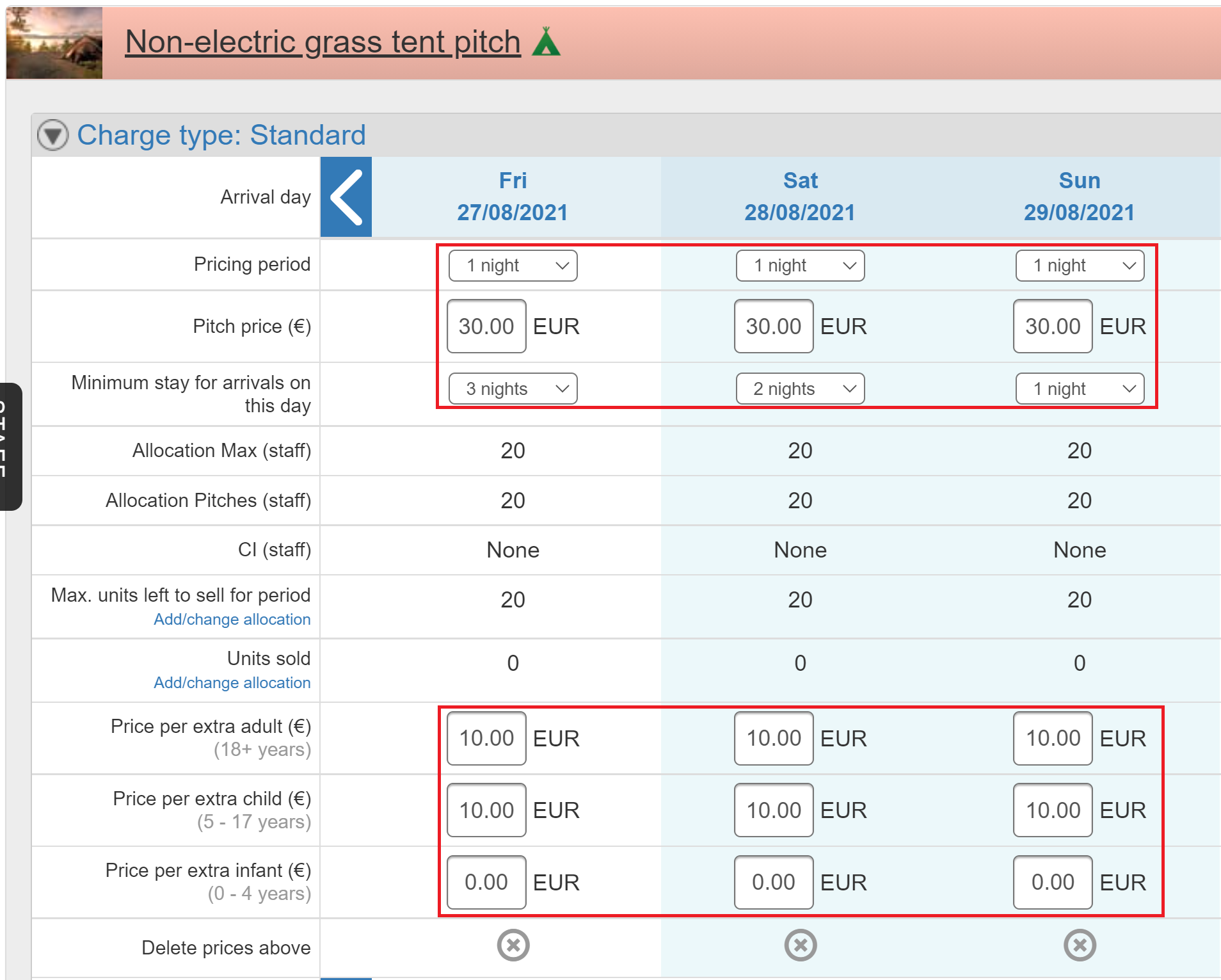
1) Customers can arrive on the Friday, Saturday or Sunday but must stay until at least the Monday: in this case, pricing period should be 1 night but the Friday should have a three-night minimum stay and the Saturday should have a two-night minimum stay.
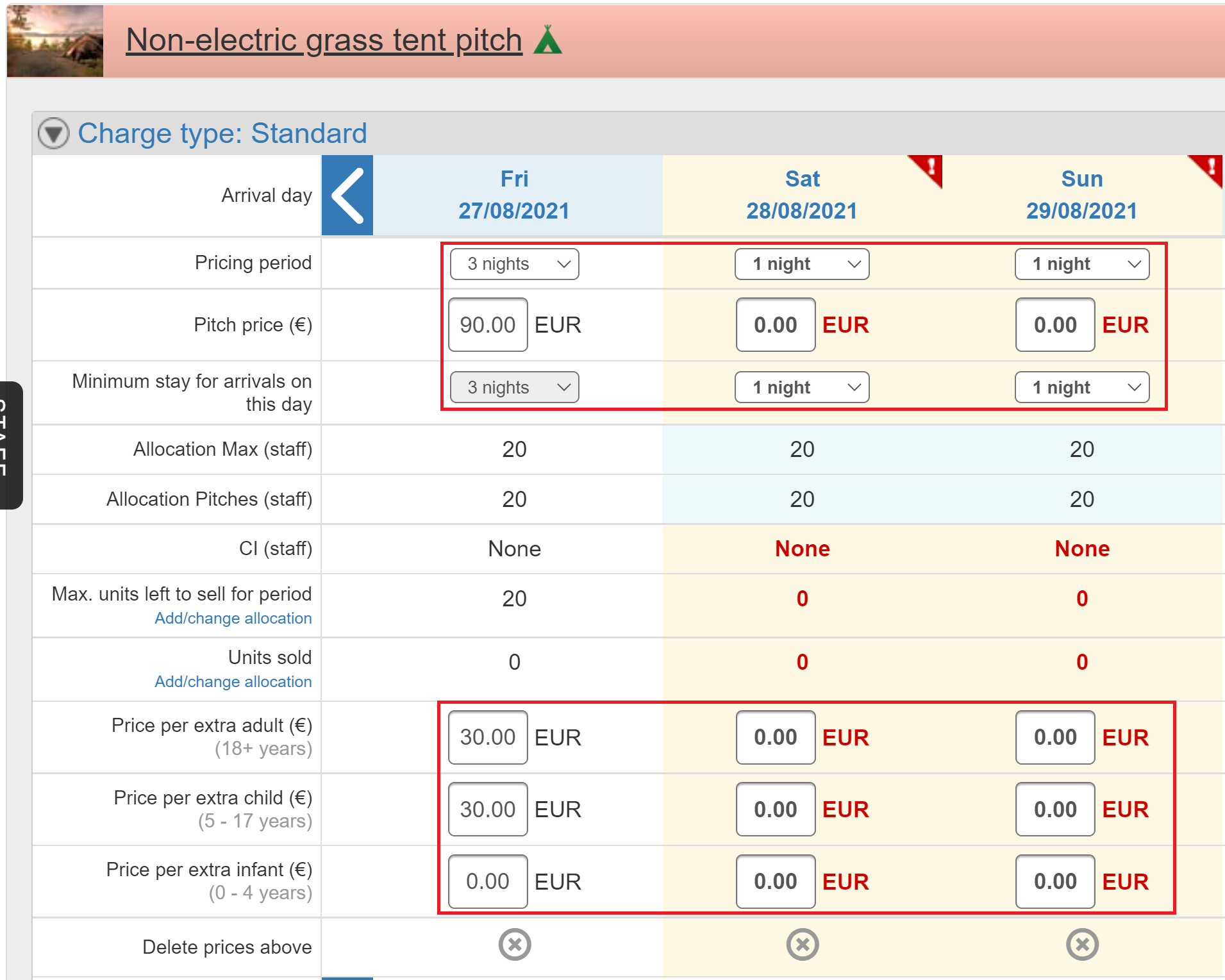
2) Customers can only arrive up to the Friday and must stay until at least Monday (no arrivals permitted on Saturday or Sunday): the Friday should have a pricing period of three and the equivalent price for the three nights together, the Saturday and Sunday should not have any prices at all.
Make sure that you multiply the nightly price of the pitch and extra persons by the number of nights in the pricing period e.g. if the pitch price is 30 per night and additional persons are 10 per night, that you put in 90 as the pitch price for the three nights and 30 as the additional persons price for the three nights.
For help adding prices, please consult this FAQ.
For nightly rates with restricted arrival/departure days
If you have nightly rates applied but want to prevent arrivals and/or departures on certain days, rather than creating multiple charge types, you can just add closed to arrival (CTA) and/or closed to departure (CTD) to specific days using the batch update rates form:
1) Click 'Batch update rates'
2) Select the days you wish to prevent arrivals/departures
3) Enter the date range
4) Select the relevant pitch/charge type(s)
5) Select 'Yes' on ‘Closed to Arrival’/’Closed to Departure’ as applicable.
6) Click ‘Apply Updates’.This will then be visible on the rates weekly view.
- How do I set up a campsite or caravan park?
Please see our guide to starting a campsite or caravan park.
- How is the Overall rating score for my site/park calculated?
The large blue Overall rating number that appears at the top of the Reviews tab on your listing is worked out from the average of all the Overall scores which guests have left in their reviews. When you have five or more reviews, this number will also appear next to your listing on the Pitchup.com results page.
The Overall rating is the guest’s chance to share how they think your site/park performed on the whole, independently of the other scores they may have already set. The other rating fields are not compulsory to fill in when leaving a review, whereas the Overall score is, and this is the score that will average your blue Overall rating number.
The Overall score a guest leaves for your campsite or holiday park in their review is not worked out as an average from the other scores they have chosen (Location, Value for money, Facilities/amenities etc).
- If my details change in the future, how can I amend them?
Easy - simply log in to your Manager Portal, click on the 'Me' button in the top right-hand corner of the screen, then select 'My details'. Update your details accordingly. If you need to change the registered manager email address for your listing, you must let Pitchup.com know and a member of the team will be able to amend this for you.
If you need to update information on your listing that you are unable to edit, remember to let the Pitchup.com know using the 'Request change' button. For more information about doing this, click here.
- I only accept adults on my site/park. How can I set this up?
If you need to set up your site as an adults-only campsite, you’ll need to follow three steps:
1) You must tick the ‘Adults only’ box under ‘Rules’ in the ‘Features’ section of the manager portal so an indication will appear on your listing page for all pitch types that the site/park is ‘Adult only’. By doing this, Pitchup.com will not show your adult-only site on the search results page if any child (up to the limit you have specified in step 2) is included in a search by a user.
2) To specify your minimum ‘adult’ age, go to the ‘Site info’ tab in the manager portal. Under the ‘General info’ section, scroll to ‘Age ranges’. Set the maximum child and infant age to the maximum child age you do not allow. For example, if you only want to accept guests aged 18 years and over, set the ‘Max. child age’ and ‘Max. infant age’ to 17.
3) You then need to go to 'Terms and conditions' and click on 'Select terms and conditions'. From the pop-up, select the term 'Guests under the age of [Age] are not allowed on site.' under 'Admissions', selecting the minimum age required for guests.

If a user lands directly on your listing on Pitchup.com or comes to your listing from another campsite or holiday park they have been viewing, i.e. they haven’t gone through the home page or general search options, and you have specified the ‘Max. child/infant age’ correctly in the portal, we will be able to prevent the user from booking if they get as far as the booking page and the guests included in their party are below the permitted ages you have set.
We also advise that you add a line to the ‘Notices’ section to your listing stating that you do not accept guests under a certain age (please specify).
- I've forgotten my password
You can request a new password using the "Forgotten your password?" link at the login page. Please ensure that you use the email address registered to your listing account.
A message should arrive within a couple of minutes with a new password. If not, please check your junk mail and if you find the message, designate it as "not spam" so that future messages get through.
If the password reset email hasn't arrived at all and the email is used is the correct one, please contact us.
- I've got restrictions about who and what I allow on my site. Can I enforce this on Pitchup.com?
This is a concern that we often encounter and one that hotel, chalet and B&B owners also raised before online bookings took hold in those sectors. Within our Manager Portal, Managers can add features to their sites, for example 'adults only', 'student groups welcome' or 'single-sex groups welcome'. This determines whether sites appear in search results for those features.
For bookable listings, we offer extra protection. Managers can add prominent rules and warnings in the booking page which users must agree to before making the booking. These messages are reiterated in our confirmation page and email, offering protection for holidaymakers and managers and ensuring that sites rules are complied with.
There are three ways that we protect you in these circumstances:
1. You can add your own prominent warning to your campsite’s page and to the booking page
2. You must add your rules to your terms and conditions either by selecting any restrictions from our large list of preset terms or, if you can't see the term you want for your site, use 'request change' button and we will add this
3. You can 'tag' your site with any restrictions using Pitchup.com’s 'facilities' page – these appear in your site's page and in the search 'filters' on the search results page
- My broadband connection is poor, how can I improve it?
Broadband speeds can vary dramatically but there are a few things you can do to improve speeds.
First, check your broadband speed using this speed test.
If your connection is really slow (0 - 2Mb)
1. If your upstream is only 288Kb (0.288Mb), then you are on a very old package, and thus should upgrade and possibly get better speeds.
2. If you are on 0.576Mb or 1.152Mb or 2.272Mb, again consider changing package to improve speeds.
3. If you have an alarm fitted or a Sky box or external ringer (bell so you can hear phone across site when out of office), ensure that there's added a microfilter to each socket so that it doesn't interfere with your broadband.
It is not uncommon to see people on old slow packages jump from 0.5Mb to 2Mb or 3Mb, or with 10 minutes of testing, realise that they can go faster by adding a device called the i-Plate.To find out whether or not you'll be able to get superfast fibre broadband for a specific property, use the line checker on your preferred supplier's website. Here's a list of communication providers currently offering or trialling superfast broadband for home or business.
Getting superfast broadband
You can check whether your local exchange is already part of BT's superfast broadband rollout plan at the BT Openreach website. BT is aiming to provide superfast fibre broadband for 40-80Mb to two thirds of the UK by the end of spring 2014.
The government has set a target for:
- 90% of UK premises within each council district to have superfast broadband (at least 24Mb) by 2015; and
- 100% of UK premises within each council district to have at least 2Mb by 2015
Local government is responsible for bridging the gap between BT's 'commercial' rollout and the government's targets, through 'local broadband projects'. In England, local councils at county and unitary level are responsible for local broadband projects. In Scotland, Wales and Northern Ireland, the devolved administrations are taking the lead.It is, however, doubtful whether the government's 2015 target will be met due to delays in procurement processes for local broadband projects.Where to find information about your council's local broadband project
Nearly all local councils have broadband projects:
- Information about local broadband projects for local councils in England
- Information about local broadband projects for local councils in Wales, Scotland and Northern Ireland
- In Cornwall, there is a plan for 95% of premises in Cornwall and the Isles of Scilly to have superfast broadband by 2014. South Yorkshire and Worcestershire also have separate schemes.
Once your exchange has been upgraded, you will still need to sign up for superfast broadband through a service providers. You will be able to see which service providers operate in your area at the links above.
Grant schemes for hard-to-reach areas
In England, For the 10% of hard-to-reach premises which will only get 2Mb broadband by 2015, the government's Rural Community Broadband Fund is available. Funding of £20m has been allocated for grants to communities.
If you're based in Wales, investigate the Welsh Assembly broadband support scheme, which provides grants of up to £1,000 for premises in broadband slowspots.
Other ideas for improvement and alternatives
- As the demands on wifi increase, it may be worthwhile having two lines: one that is used for the site wifi, and another just for the office.
- Trying different routers is a good idea: routers stocked by the big chain stores are often not up to the job
- If you broadband speed is still low, you might want to investigate satellite access which may provide a more reliable system.
- A leased line may be an option if your budget stretches to it
With thanks to thinkbroadband.com
- My opening times change each year, and some accommodation types open longer than others. How can I show this?
Please indicate the opening times of the accommodation type that's open longest. If your opening times change significantly, please show your expected opening dates, or actual dates for the previous season if they're not available yet. Add these dates to the 'Site info', then 'General info' tab in your manager portal.
- My site is listed on your website - how can I amend my listing?
Log in to the Manager Portal - there you can update your details, optimise your listing and view the stats on your dashboard. If you've forgotten your password, click the reminder link on the login page using your registered email address.
If you do not yet have a password, or your email address has not been linked to your site, click 'Claim this site' on your campsite's page.
If your site is not yet listed, find out more about becoming a bookable listing here.
- My site isn't listed. How can I add it?
To add a site, check we don't already list it (we often do!). If we do list your site already, let us know its yours by clicking ‘Claim site’ on the listing page (you’ll find this under the ‘Manage listing’ header towards the bottom left-hand side of the listing). This will send a notification to the Pitchup.com team. Alternatively, find and select your site using our sign up form, and submit your details to us there.
If we don't already list your site, just fill in our sign up form and start completing your listing in our manager portal (which you’ll gain direct access to). Please note, we have a backlog of free listing requests but we will review your information and activate your free listing as soon as possible.
If you’re after a bookable listing, once you are in the manager portal, please click the blue ‘Add business details' button on the home page. Complete the thermometer in the manager portal and click ‘Request activation’ when you get to 100%. Upgrading to a bookable listing is free, for more information click here.
If you need any help setting up your bookable listing, just contact us. A link to our site would be appreciated.
- My tariff involves short breaks, weekly stays and/or variable nightly rates - how do I set this up?
If you have different price options, there are two ways to do this. For each pitch type:
- If your alternative tariffs apply to different arrival days (for example, a typical static caravan tariff of Sat - Sat OR Mon - Fri OR Fri - Mon), then you can add this information to a single charge type*.
- If your alternative tariffs apply to the same arrival days (for example, different rates for different stay lengths on the same arrival day), then you'll need to set up a charge type for each extra pricing option. A 'standard' charge type is automatically created, so you can use that for one price and set up another for each additional one. For example, if you offer nightly, weekly, or short break pricing starting on the same arrival day, you'll need three charge types in total so you'll need to set up two more.
* When you set up a pitch type in the 'Pitch types & extras' page, a 'charge type' (set of prices for each arrival day) called 'Standard' is created beneath
Adding or updating complex pricing
If your prices change regularly, it will be faster to use the 'Batch tariffs' page in the 'Rates' tab to update your prices. Once you've entered your prices, click 'Apply changes' to apply rates, and revisit the main 'Rates' tab to check.
Add allocation by using the blue 'Batch update allocation' button on the right of the 'Allocation' page, and make any detailed changes using the daily calendar on the 'Allocation' page.
- What are your “official ratings” and “Customer ratings” for campsites and parks based upon?
Some holiday parks and campsites are accredited with star ratings from the local tourist board - these ratings are marked as "official rating" in the campsite page. The Customer rating is the average overall rating awarded to the site in reviews submitted by Pitchup.com users.
- What is a 'calendar conflict' and how do I resolve these conflicts?We now check calendar feeds automatically for overlapping dates between Pitchup bookings and external bookings from calendar feeds, incidences of where the two overlap is called a calendar conflict.a) To view the conflict:
- Visit your allocation page
- On the left-hand side, click or tap on one of the pitch types to expand the pitch type section

- For any unit showing a red hazard symbol, click the name of the unit: this will launch a popup

- Find the red 'Conflicts' section in the popup

- Click the link of the overlapping Pitchup booking to be taken straight to the month of the booking. Any bookings with conflicting dates will also appear with a red border on the calendar

b) You can resolve conflict by doing one of the following:
- Flagging the Pitchup booking to change the dates and/or pitch type, OR
- Cancelling the Pitchup booking by flagging it, OR
- If the Pitchup booking has already been cancelled, removing it from the allocation grid: visit the allocation tab, click the booking and then the red 'Remove booking' button at the top right,

OR
- Using the mouse to drag the Pitchup booking upwards/downwards onto another unit (Pitchup bookings can be dragged onto an external booking of equal length on the same pitch type), OR
- Removing the duplicate entry from your booking system. If you need to report the problem to your booking system provider, please include details of the conflicted bookings and the calendar link.
Once conflicts have been resolved, you may wish to click the reset button to set allocation for a pitch type back to all potential spaces.If you need to add any external bookings to the calendar, you can do so manually by :- Visiting your allocation tab:
- Ensuring the grid is expanded by clicking on the small arrow in the pink pitch type name box (on the left)
- Clicking on any of the date boxes and adding the booking details, then clicking on 'Add booking' to save

Should you have any further questions or need anything else at all, please let us know. - You’ve got the wrong sites listed against my email address – how can I correct this?
Please tell us about this error using the ‘Add or remove sites?’ button under 'All sites'.
Payup
- About Payup
Payup is a brand new service from Pitchup.com enabling you to link your bank account to our system so we can trigger payments from the customer automatically.
Payup is currently available for business located in these countries (except any marked 'private beta'). Unfortunately businesses based in a British Crown Dependency (Jersey, Guernsey or Isle of Man) or a British Overseas Territory such as the British Virgin Islands are not supported currently.
Payup is really good! So glad you integrated this as now it means we aren't continuously on the phone/trying to get hold of people to pay the outstanding balance, as it gets taken automatically - it goes straight into our account so we have more time to deal with other things, I even enabled the Stripe emails so I know when they have made the full payment 14 days before arrival too and it links in well with the dashboard as I can see paid/pending/cancelled next to their booking ID! So glad you got it as we were spending so long making phone calls every evening (as most were at work during the day too and unable to pay!). Thanks.
Daniel Yallop, Manager, King's Lynn Caravan and Camping Park
We started using Payup as soon as it launched and have never looked back. Previously had to chase balance payments which was very time consuming and involved another process for the customer. Whilst no business likes to pay fees of any description we believe the cost is worth it and business has increased as the booking process is easy for the customer.
Sarah Wherry, Owner, The Pig Place
- Can I change my Stripe details?
Stripe allows you to both change the receiving bank account and update company information.
- How does Payup work?
We are working with a payment company called Stripe. Their system powers Payup to bill the customer’s card and send the deposit to Pitchup.com and the balance directly to you.
The balance will be billed to the customer on the 'due date' which already appears in confirmations for most sites. We calculate this based on the settings in the payment section of your portal.
- How much does Payup cost?
The processing costs for Payup payments depend on where your bank account is located:
1. Businesses with Stripe accounts linked to banks in the EEA (except Norway)
A per-transaction fee of 20p or €0.25 or 1.8kr, plus:
- if your bank account is in the UK, 0.3% for domestic debit cards and 1.4% for all other cards issued in the EEA (including domestic credit cards)
- if your bank account is elsewhere in the EEA, 2.5% for all cards issued in the UK and 1.4% for all cards issued in the EEA (including domestic cards)
- 2.9% for international (non-EEA) cards
There are no additional interchange or gateway fees (such as SagePay costs), and Pitchup.com itself does not charge extra for Payup.
Payup should be cheaper than your existing payment service. A common misconception is that payment costs consist solely of the 'acquirer' fee, the amount paid to the company receiving the payment on behalf of the site owner (e.g. Streamline/Global Payments/Barclaycard). However, there are two other types of payment cost. The 'interchange' fee can be as much again, and - for online payments - a third fee (the 'gateway' cost/'payment service provider' cost) is also payable, normally 5-10p per transaction.
Many site owners will be comparing Payup to telephone-based card payments. However the acquirer and interchange fees for payments over the telephone, known as "MOTO" payments, can be even higher.
If you enjoy cheaper interchange rates by using 3D Secure, please note that many merchants report that 3D Secure causes conversion rates to fall by more than the saving in interchange rate.
2. Businesses with Stripe accounts linked to banks in the USA
2.2% + $0.30 per transaction.For users who signed up from 14th September 2017, non-US card transactions are charged an additional 1% fee.3. Businesses with Stripe accounts linked to banks in Canada2.9% + $0.30 per transaction.For users who signed up from 14th September 2017, non-Canadian card transactions are charged an additional 0.6% fee.4. Businesses with Stripe accounts linked to banks in other countriesPlease visit www.stripe.com/pricing/ to view pricing.
American Express
We do not currently accept American Express.
Refunds
Starting on April 1st 2020, Stripe will no longer refund their fees, however they may consider this if you ask them directly.
Note: if a booking is for immediate payment, only one transaction will occur with the name of your site as the payee. In this scenario, you will bear the full transaction fee.
- Who are Stripe?
Stripe is an online payments company founded in 2010 by Irish brothers John and Patrick Collison based in San Francisco. It was recently valued at $1.75bn and is backed by some of the leading investors in the online sector. Clients, who include Rackspace, The Guardian, Salesforce.com and Virgin, can accept payments in over 130 currencies.
Reviews
- How is the Overall rating score for my site/park calculated?
The large blue Overall rating number that appears at the top of the Reviews tab on your listing is worked out from the average of all the Overall scores which guests have left in their reviews. When you have five or more reviews, this number will also appear next to your listing on the Pitchup.com results page.
The Overall rating is the guest’s chance to share how they think your site/park performed on the whole, independently of the other scores they may have already set. The other rating fields are not compulsory to fill in when leaving a review, whereas the Overall score is, and this is the score that will average your blue Overall rating number.
The Overall score a guest leaves for your campsite or holiday park in their review is not worked out as an average from the other scores they have chosen (Location, Value for money, Facilities/amenities etc).
- How should I respond to a review for my site/park?
It's usually better to reply to your customers rather than disputing their reviews. Try and turn things into a positive... To keep things clean, please follow the guidelines below - Pitchup.com's review system is an open forum and we reserve the right to remove content in violation of these guidelines.
- Try not to be defensive - address any problems in a courteous and factual way
- Avoid personal insults and naming of individuals
- Don't include your contact details, invite users to contact you direct, offer discounts or special offers, make reference to your own website, or direct guests to your website for information about your site/park. Everything they need to know should be on your Pitchup.com listing!
- Avoid unnecessary CAPS, swear words, vulgar comments or sexually explicit language and keep an eye out for typos!
Please note that your comments are not automatically emailed to customers.
- I have reviews, but no review score is showing at the top of my listing
We only show an overall rating score at the top of your listing and in search results once you have five reviews. This is to ensure that the overall rating is representative of your site.
Please note that only the overall scores of each individual review contribute to the overall rating, not the ratings for cleanliness, facilities, etc.
- My site has received a negative review. How can I remove it?
Our user reviews are intended to provide another perspective on our listed sites. Negative feedback is inevitable in any worthwhile reviews system and we hope that managers will treat constructive criticism as just that.
Although we don't remove reviews simply because they are negative, we recognise that not all reviews are genuine or accurate. To respond to a review you can:
1. Add a comment (recommended). In the 'Reviews' tab of our Manager Portal you can add a 'manager comment' to any review and this will be published beneath the live review. Please note that users do not automatically receive a copy of your comment. For guidelines on how best to comment on a review, see How should I respond to a review for my site/park?
2. Use our dispute process. You can ask us to remove a review that is from a fictitious guest, contains serious personal insults, or contains substantial false information by clicking 'dispute' next to the review in your Manager Portal. Reasons must be provided in the dispute form. A disputed review will be removed from Pitchup.com pending our investigation of your complaint. Please note that we will only remove reviews in exceptional circumstances. Customers' trust in Pitchup.com is based on the fact that we publish their reviews, albeit some of them may appear to be unfair feedback. In the majority of cases we will please ask that you use the manager comment section to set the record straight and this will appear directly below the review on your listing page.
To add a comment or dispute a review, log in to your Manager Portal, click the 'Reviews' tab and find the review you would like to address.
As an additional service, Managers can opt to receive alerts of new reviews in the Manager Portal. If you have not claimed a Manager Portal for your site and registered your email with us, please follow the instructions to do so on the sign up form.
Please note that Pitchup.com operates as an open forum and takes no responsibility and assumes no liability for any content posted, stored or uploaded by any third party, or for any loss or damage thereto, nor is Pitchup.com liable for any mistakes, defamation, omissions, falsehoods, obscenity, pornography or profanity you may encounter.
For more information on our content policies please visit our terms and conditions.
-
TripAdvisor is an open forum and publishes all reviews which meet our review criteria. Please be aware that TripAdvisor cannot accept unsolicited documentation regarding the validity of reviews. Owners are welcome to write a management response to any review they receive.
-
- There’s been a major development at my site/park. Can the reviews left prior to this be removed?
If your campsite or holiday park has undergone a major development, i.e. refurbishment or renovation, Pitchup.com will consider removing the reviews (good and bad) that have been left prior to this date, in order to offer your business a fresh start.
Certified written proof of the substantial refurbishment/renovations at your site/park can be submitted to Pitchup.com (enquiries@pitchup.com), in the form of one of the following:
- Copies of the building/work permits
- Copies of the traders’ receipts for material and labour
The Pitchup.com team will assess the documents submitted and if they meet the criteria required, the reviews will be removed. Pitchup.com will handle such requests on a case-by-case basis.
Please note that the redecoration of old facilities or a handover in ownership or management do not constitute legitimate grounds on which you can request to have your site/park’s past reviews removed.
Terms on Coronavirus
- How can I best prepare for the end of this crisis?
Many new sites are currently joining Pitchup with summer allocation. While no one can predict the trajectory of this crisis, the likelihood is that if it ends before summer, booking windows will be extremely short.
Pitchup excels at delivering high numbers of bookings at short notice, with some clients receiving over 50 per day even in normal times. Half of our bookings last year were taken on our award-winning mobile site, particularly suited to late bookings. With our SEO, newsletter, public relations and paid-search campaigns and translation into 16 languages, we'll leave no stone unturned to sell your vacancies.
Here are our recommendations on minimising the impact of this crisis:
-
Encourage existing customers to postpone, not cancel
-
Attract new bookings by relaxing your cancellation policy
-
Switch to taking the balance in advance. This provides up to 12 weeks’ cashflow benefit, even more so if the option below to pay in full is ticked. You would receive the balance directly from the customer’s card on the due date, enjoying industry-leading low processing fees we've specially negotiated for Pitchup clients. Around half of our clients use this method : please note this option is only available if the same policy applies to direct bookings (Site info tab / Payments)
-
If you take payment in advance, ensure you are allowing customers to pay the full amount on booking (Site info tab / Payments / tick ‘Allow users to choose to pay full amount immediately.’)
-
Review our ideas on how to improve your ranking and results
-
Attract ‘far-future’ bookings by adding availability for 2022 and beyond How to add allocation How to add rates
-
Take advantage of this period to set up integration with your booking system. The post-pandemic period will be busy: you’ll want to generate as many bookings as possible, but managing the recovery will be much easier with systems working seamlessly together
-
Unprecedented government support is available for your business
Contact your account manager or our customer service team for more help.
-
- How can I contact Pitchup?
Please use our contact form: we monitor email and chat every day.
See also How do I close or remove allocation over a longer period?
- I'm closing. Do you have a template to send to customers?
The BH&HPA (British Holiday and Home Parks Association) has produced a template to send to customers affected. Please tailor this to your specific circumstances.
See also How do I close or remove allocation over a longer period?
-----------------------------------------------------------------------------------------------------------------------------------------------
These are unprecedented times. We all have a responsibility to consider not just ourselves but to the people of our country, the local community and on this park.
We are having to make decisions and take actions which were unimaginable a few weeks ago.
We have closed/are closing with immediate effect all facilities on the park.
Thank goodness for the announcements of support which have come from Government which should help us to be ready to resume business just as soon as the crisis passes; we will be making effort to ensure our staff are looked after during this period.
We are speaking to all holiday hire and touring bookings to ask them to stay away and to offer alternative dates when the crisis is over.
We are expecting the Government to give us more guidance very shortly. We expect a clear message that holiday and touring parks must not stay open for business as usual.
The time for you to leave in an safe and orderly way is limited.
If there is any reason why you cannot leave, you need to discuss that with us now.
Over the last 24 hours, there has been an increasing and understandable concern in local communities towards holiday visitors. The government's clear guidance is that there must be no unnecessary or non-essential travel.
We ask private owners who are not on the park not to come here, and if you are on the park please go home. We are following the Government's guidance so closing to protect you and wider society.
I urge you to co-operate at this difficult time please. - I’ve closed. Can you help me decide when to reopen?
Pitchup is still receiving up to 50,000 pageviews per day, but booking levels have dropped significantly. We will be transparent about increases in traffic and booking rates to help owners develop their plans. Booking behaviour will be primarily determined by government guidelines.
Subject to evolving government and local guidance, consider testing the market by relaxing your cancellation policy and adding allocation later in the year.
You can monitor the number of availability alerts pending on the homescreen of your manager portal. When a site has no availability for a particular day (even when it’s closed), customers can sign up for an alert when it becomes available. While the dates of these alerts are not shown, the overall number is a useful barometer of interest.
See also: How can I best prepare for the end of this crisis?
- Should I close my site?
Sites have now closed in most countries. In the UK, you are now required by law to close your site except in limited circumstances and customers should go home safely. (View also Wales-specific advice and proposals and Scotland-specific advice.)
The UK government requires the public not to stay away at home overnight except for limited reasons. A rebuild plan was published on 15th May putting 'accommodation' into Stage Three, reopening from 'at least' 4th July. 'COVID-19 Secure' security guidelines are to follow as reopening dates approach.
Major chains have announced closures until the following dates:
- Haven have closed until 2nd July
- Parkdean has closed until 5th July
- The Caravan and Motorhome Club has closed Club Sites and CLs, "planning on the assumption that we will be able to introduce a phased reopening of our sites network during July"
- The Camping and Caravanning Club has closed Club Site until at least the beginning of July
- Center Parcs has closed until 11th June
See also
How do I close or remove allocation over a longer period?
Will you automatically cancel my bookings if I close the site, or set allocation to zero?
- What is Pitchup doing to lessen the impact of the crisis?
We have been working hard to minimise the impact while ensuring public health guidelines are met:
-
For bookings made before March 1, 2022, we have extended our window for crediting deposits on cancellation to 3 months from the original arrival date, to encourage customers to rebook
-
All queries from live clients have been moved to a priority customer service queue, enabling us to deal with thousands of weekly enquiries from site owners and holidaymakers
-
We have published customer-facing and site owner-facing Coronavirus FAQs which we are updating regularly
-
We have updated numerous national and local media outlets on trading and the status of bookings. Topics submitted include ‘far-future’ booking behaviour
-
We have reconfigured our marketing campaigns to reflect a future staycation-led travel market (according to Google, declines in international travel are around twice as severe as domestic)
-
Our team has been working fully remotely since 16th March and is available every day to answer your questions (contact details)
-
We have made significant website performance improvements, in anticipation of recovery
-
- What UK government support is available for my business?
The UK government has announced extensive measures to help mitigate the impact of Coronavirus:
-
No business rates in 2020/21 for hospitality businesses (including caravan parks and campsites), irrespective of their size, to be applied automatically
-
Retail, hospitality and leisure businesses with a Rateable Value between £15,000 and £51,000 will be eligible for a government grant of £25,000
-
A grant of £10,000 for all businesses eligible for Small or Rural Business Rate Relief
-
The Coronavirus Job Retention Scheme, whereby employers can get a grant of 80% of wages for staff not working (‘furloughed’), of up to £2,500 per month. This will be backdated until 1st March and open for 3 months initially. The first payments are due at the end of April
-
VAT relating to the period 20th March to 30th June deferred for all businesses automatically, payable instead at the end of the financial year instead. For the self-employed, Income Tax payments due on 31st July 2020 will be deferred until 31st January 2021
-
The Coronavirus Business Interruption Loan Scheme (up to £5m) and Bounce Back Loans (up to £50,000) are interest-free for 12 months and guaranteed or part-guaranteed by the government
-
HMRC’s Time to Pay scheme for businesses and self-employed people in financial distress, with outstanding tax liabilities
-
Self-employed people will be able to access, in full, Universal Credit at a rate equivalent to Statutory Sick Pay for employees
-
Statutory Sick Pay relief of two weeks per eligible employee absent for COVID-19, for SMEs only
Visit gov.uk for more information and to apply for any measure that are not automatic. Announcements were also made in Scotland, Wales and Northern Ireland.
-
- What will my insurance cover?
Standard business insurance policies exclude pandemics and most businesses are unlikely to be covered. However, policies differ significantly and you should check with your insurer. Further guidance is available from the Association of British Insurers.
- Where can I find more information?
General
UK
Public Health England cases by region data visualisation
Association of British Insurers
British Holiday & Home Parks Association on Twitter

